
Detecting timeout within a flow
Use the Timeout module in parallel with your input flow to detect when no data is arriving from a subscribed source and trigger a notification if updates stop within a defined time window.
Your flow is deployed and running and does not report any errors, yet no data appears at the output. This usually means that no data is arriving from the source, or no messages arrive on the output due to filtering or not matching conditions.
When you have a subscription to an external system, such as OPC UA or MQTT, the corresponding module only sends a message when a change occurs in the subscribed data. If no change happens, no message is produced. In some situations, it is useful to detect when updates stop arriving altogether.
To achieve this, you can use the Timeout module. Configure the Timeout module in parallel with your main processing flow and connect it to the same input. If no data is received within the configured time window, the module can trigger a message or event that is sent to an external system.
Optionally, the Timeout module can be configured to monitor a specific tag and to distinguish between unique values, allowing for more precise detection of missing updates.
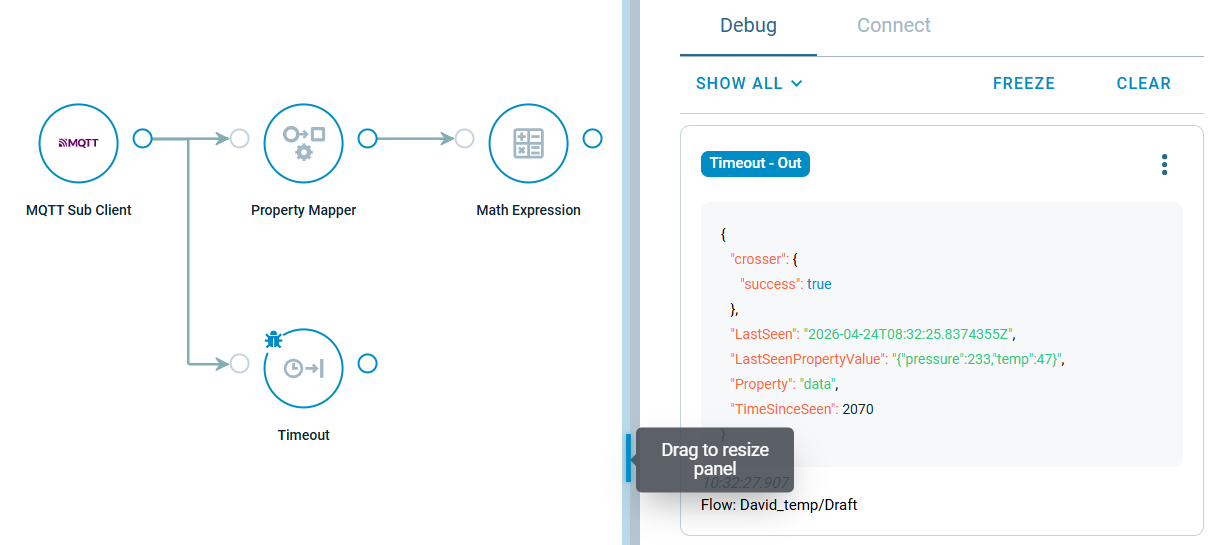
Tip: Did you know that you can expand the Debug-Panel on the right by dragging the bar?
